Category Archives: Crystal Reports

GROUP SORTING WITH FORMULAS

I was recently asked to prepare a report that would divide by data set into distinct categories. Each category would then drill down into a sub report with details. The categories were alphanumeric, which initially posed a problem as they needed to be sorted according to the numeric values inherent in the category. In this case, 2 would be preceded by 23, then 6, where I needed the 23 to come after the 6. Here is the formula for the categories, which is based upon a formula calculating the seconds between date times:

In Group Expert there is an option to “Use a Formula as Group Sort Order”, however it’s implementation is limited in that the formula must return a specific ordering constant. This didn’t apply in my case. Fortunately what I discovered a solution. By creating your own formula without constraints, it can be applied as the sorted and grouped by option in Change Group Options of Group Expert. I used the same time constants in my original formula to determine the sort order:
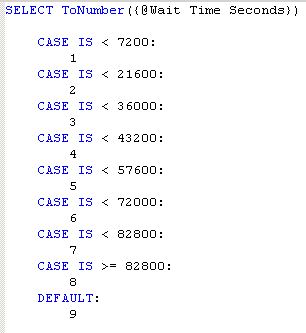
I was then able to apply this formula as the grouping and sorting for the group:

The effect was as desired:

The next request was to create a summarized Cross-Tab of the same information. Again, using the categories resulted in incorrect sorting. I was able to use the sort order formula for the grouping, but this would then display the values of the sort order, and not the categories. I was kind of backwards from where I started. Poking around the Cross-Tab Expert, I found that you can customize the group name by using a formula, which in my case was the formula that produced the alphanumeric categories:

Deleting History Connections in Crystal

I added a new table to a Cache database in a specific schema.  When I launched Crystal I already had  historical connection to the appropriate data source, and the newly added table would not display.  I tried refreshing the connection and verifying the database and still the new table would not show up.  I knew I needed to delete all the current / favorite / historical connections but the option was greyed out in the database expert.  I found out that the historical data source connections are stored locally on the workstation as XML files in the following directory: C:\[DocumentsAndSettings][Users]\<username>\My Documents\History.  I deleted these files and re-launched Crystal wherein I was able to re-create the connections and the table finally showed up.

Happy Reporting

*Update 08/11/2020

One reason I write about issues I deal with is to help others experiencing the same problem. However I will admit that these also serve as a personal knowledgebase (deduct altruism points). I was working with one of my report developers today and we started seeing some strange behavior. While in design view for a report that had already established connections to a data source, we attempted to add a table and none of the SQL Views would should under the schema we were traversing. We verified the database, logged off and back on the server, finally restarting the workstation. When the report was reopened we started receiving errors “Failed to retrieve data from the database” followed with “connection reset by peer (due to timeout or reboot).” Now this only happened when my developer tried authenticating on his workstation. I was successfully able to establish a connection on my computer. Last thought was that there must be something wrong with the data source. I remembered this post and followed the directions. After deleting the cached connection, my developer was able to re-authenticate and view all of the schema information successfully. I hope this information is valuable to others.

As always, Happy Reporting!