Giving back

Work life, for too long, was life. My identity was strongly tied to and centered around my job. And do not misconstrue this as a blanket admonition; I have a great position at a company providing valuable services to the community, with some wonderful associates I can call friends. I have earned and been given much, and I needed to give back.

As a human condition, there is a universal search for a purpose, to define a meaningful life. For myself, a fantastic opportunity presented last year, wherein I was gratefully accepted to serve on the Board of Directors for Seniors First.

Our mission is to enhance the quality of life of seniors by maintaining their independence and dignity.”

Seniors First – Who We Are

After initial introductions and meetings with executive members of this organization, and prior to joining the Board, I was afforded the opportunity to assist in a delivery route for one of their well known services offerings, Meals on Wheels.
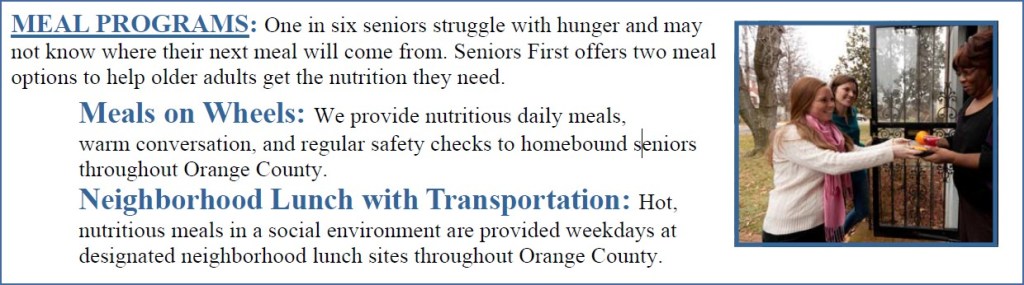
Meal Programs

This was a truly rewarding experience. It brought me back to my late teens – with my great-grandfather in his upper nineties and no longer driving, it was my honored duty to bring him over to our house for dinner each night, and take him to his weekly grocery store trips. My family was fortunate, but many others are not. Seniors First steps up with great strength to fulfill this critical need.

Stepping Stone Medical Equipment Bank

Another great offering from Seniors First is the Stepping Stone Medical Equipment Bank. As my father grew ill after his stroke, he required several assistive devices to resume daily living activities. These included walkers, shower chairs, manual and powered wheel chairs, and ultimately an in-home hospital bed. Upon his passing I was able to donate some of these items, but not all. I want to help spread the mission of Stepping Stone, so that others in my position will be able to help as many others as possible.

Seniors First provides several other services, including In-Home Care, Guardianship, and a Food Pantry.

Donations are a significant lifeline to the sustainability of these operations. If you are of the heart and ability, monetary pledges can be made directly here, or you can text FeedaSenior to 76728. Food Pantry and Personal Care Items are additional ways you can support, and can be dropped off at the below location, 5395 LB McLeod Road, Orlando:

Lastly, I extend a huge thank you to the exuberant and compassionate servitude of the staff and leaders of Seniors First. You truly help define what a community is.

exorcising ghosts

ERROR: THROWING MICROSOFT.REPORTINGSERVICES.DIAGNOSTICS.UTILITIES.REPORTSERVERSTORAGEEXCEPTION: , AN ERROR OCCURRED WITHIN THE REPORT SERVER DATABASE. THIS MAY BE DUE TO A CONNECTION FAILURE, TIMEOUT OR LOW DISK CONDITION WITHIN THE DATABASE.;

Subscriptions failing. Cryptic messages. “Failure sending mail:Failure sending mail”. Time to check out the logs. I’m running SQL Server 2016.

In SQL Server Reporting Services 2016 or earlier: C:\Program Files\Microsoft SQL Server\MSRS13.MSSQLSERVER\Reporting Services\LogFiles

Where to start…

Do I look at permissions? Service Accounts? Network conditions? Disk Space/Queue Length?

This was it. This was the error filling up our SSRS logs at a rate of over 9,000 entries/second, 32 MB log files produced every minute, for the last 4 1/2 days. 483 GB in all. Storage volume was 1.10 TB free of 1.72 TB so I could breathe a little easier. CPU was not spiked and memory allocations were optimal. No authentication issues present, and network connectivity was strong. What was happening he pondered?

SQL Server Profiler, you wonderful tool, to the rescue. I began a trace and found the gremlin instantly:

exec msdb.dbo.sp_delete_job @job_name=N'72383D9B-8662-4973-B71F-402DFAC50F1C'
go
exec msdb.dbo.sp_delete_job @job_name=N'72383D9B-8662-4973-B71F-402DFAC50F1C'
go
exec msdb.dbo.sp_delete_job @job_name=N'72383D9B-8662-4973-B71F-402DFAC50F1C'
go
exec msdb.dbo.sp_delete_job @job_name=N'72383D9B-8662-4973-B71F-402DFAC50F1C'
go
exec msdb.dbo.sp_delete_job @job_name=N'72383D9B-8662-4973-B71F-402DFAC50F1C'
go

This is what happens when your server attempts to delete a ghost, a job that has passed and is no longer with us. The resolution was quite simple – bring the job back to life. Create a new job with the same name, purpose unimportant. Within a millisecond the job will be terminated. We mourn the loss, all except the log files which take a much needed rest.

Happy Troubleshooting!

GROUP SORTING WITH FORMULAS

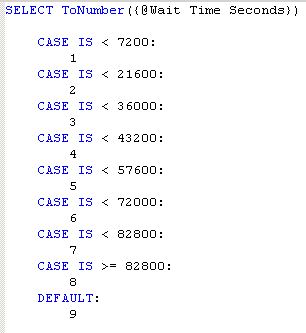
I was recently asked to prepare a report that would divide by data set into distinct categories. Each category would then drill down into a sub report with details. The categories were alphanumeric, which initially posed a problem as they needed to be sorted according to the numeric values inherent in the category. In this case, 2 would be preceded by 23, then 6, where I needed the 23 to come after the 6. Here is the formula for the categories, which is based upon a formula calculating the seconds between date times:

In Group Expert there is an option to “Use a Formula as Group Sort Order”, however it’s implementation is limited in that the formula must return a specific ordering constant. This didn’t apply in my case. Fortunately what I discovered a solution. By creating your own formula without constraints, it can be applied as the sorted and grouped by option in Change Group Options of Group Expert. I used the same time constants in my original formula to determine the sort order:

I was then able to apply this formula as the grouping and sorting for the group:

The effect was as desired:

The next request was to create a summarized Cross-Tab of the same information. Again, using the categories resulted in incorrect sorting. I was able to use the sort order formula for the grouping, but this would then display the values of the sort order, and not the categories. I was kind of backwards from where I started. Poking around the Cross-Tab Expert, I found that you can customize the group name by using a formula, which in my case was the formula that produced the alphanumeric categories:

Change Management – Carpe Futurum – Moment of Truth

So I put three different subjects in the title because there are a bunch of different but related thoughts swirling around.  For a few years now I’ve been engaged as the technical support for a large project, merging three electronic health records into one.  I worked hand in hand with the primary project manager.  Two days ago without warning I received a company memo that the project manager was being reassigned due to a larger reorganization, effective two days from now.  I had a flood of emotions pour in; surprise that I didn’t know, anger that the manager was ditching the project well before completion, happy that the manager was getting to do something he enjoyed more, anxiety about the future.  That last one is the hard one, born of change, which itself is the only permanence we are guaranteed, to paraphrase a great friend and mentor.

And it is true, the only permanent thing in life is change.  That’s been more than evident the last few years as the company I worked for merged with two others, and as my personal life faced challenges I never could have anticipated (hopefully I will finally write about those later on).  I recently read A Survival Guide to the Stress of Organizational Change (Pritchett & Associated, Inc.) that I’m referring back to now.  It has information on mistakes we make that create stress, way of coping with change, how to win by surrendering, and how to manage stress and that stress can be a helpful tool when managed.

So how do I manage stress?  I structure stress management in a holistic model having three main components: 1. Physical, 2. Mental, 3. Spiritual.  I’ve conquered Physical pretty well.  My diet is primarily protein and vegetables with very limited carbohydrates and sugars.  I’m at the gym every weekday morning and perform PT exercises at home in the evenings.  My sleep still needs some work – I aim to be in bed at 9 and asleep by 9:30, and I’m up at 4:15 to hit the gym.  Mental is harder – having a mentor has been instrumental in paving a path.  Meditation is important.  And this doesn’t have to be sitting on the floor with your legs crossed and humming “Ohhmmmm…”  Meditation for me takes place when I’m on my motorcycle, when I’m taking a walk, when I’m enjoying my morning coffee.  It’s any time that I get to be alone and can reflect on life.  Spiritual is the big hurdle right now, but I’ve started making steps.  I’m not religious, have not been for a very long time, but after reading an article recently I’m coming to the conclusion that there are benefits to engaging the spirit, that a place of worship doesn’t have to be a church, but that a place of worship regardless of deity or theology can provide the structure to cull out the negative and toxic parts of life that so often define us and help replace them with the positivity that should sustain us.  It’s going to take me a little while, but I believe I can get there.

I don’t know where my professional life is headed right now, but I’m definitely at a crossroads.  I’m hoping to get some insight soon from my leadership, the uncertainty on how my functions are going to change is uncomfortable, but there is one thing that I am certain of: I believe in myself. Just hours before the reorganization memo was sent out I finished reading Simon T. Bailey’s Release your Brilliance.  One of the ending chapters is dedicated to realizing those big and important moments in life where change is occurring, and once defined to seize on them and act, to not sit idly by.  I won’t be sitting, I’m pledged into action, we’ll see what exciting adventure awaits!

Best and Easiest Way to Make a Copy of a Table Including Existing Data

I have a new developer learning the ropes and who has created his first application with a simple CRUD interface.  Before placing the app into production I wanted to make sure to retain the existing contents of the table that would be manipulated, because, you know, stuff happens.  I went searching for a solution and came across this Technet article that exposed a beautiful mechanism for accomplishing this that I was not aware existed:


SELECT * INTO schema.new_table FROM schema.existing_table

And that’s it.  This will create the brand new table (it cannot already be created) containing all of the information from the existing table.

Simple and elegant.  Doesn’t get much better or easier than that.

Happy coding!

Empty string returned when concatenating a field to a space with REPEAT or REPLICATE

I was creating a query against an Intersystems Cache DB where the fields needed to be fixed length to export to a flat file. For a field with data of length 4 and an file specification of length 10, I need to concatenate 6 spaces to the end of the data. With other systems I’ve always accomplished this using a REPEAT or REPLICATE function, calculating the amount of spaces as flat file specification length minus the field length. This query would look like this:

SELECT field || REPEAT(10 – LEN(field)) FROM Table

In Cache though, what returned was a completely empty string. Knowing NULL values can cause this, I made sure there was data in the field. I tried using different concatenate operators like || or fn{ Concatenate()} but still had the same results. After pecking around, I found a different function, SPACE(), that does exactly what I needed, adding in a specified numbers of spaces to the end of a string. I tried this in my query and finally got the expected results:

SELECT field || SPACE(10 – LEN(field)) FROM Table

I’m still not sure why REPEAT and REPLICATE were behaving like this, but I’m glad there is a viable option.

Deleting History Connections in Crystal

I added a new table to a Cache database in a specific schema.  When I launched Crystal I already had  historical connection to the appropriate data source, and the newly added table would not display.  I tried refreshing the connection and verifying the database and still the new table would not show up.  I knew I needed to delete all the current / favorite / historical connections but the option was greyed out in the database expert.  I found out that the historical data source connections are stored locally on the workstation as XML files in the following directory: C:\[DocumentsAndSettings][Users]\<username>\My Documents\History.  I deleted these files and re-launched Crystal wherein I was able to re-create the connections and the table finally showed up.

Happy Reporting

*Update 08/11/2020

One reason I write about issues I deal with is to help others experiencing the same problem. However I will admit that these also serve as a personal knowledgebase (deduct altruism points). I was working with one of my report developers today and we started seeing some strange behavior. While in design view for a report that had already established connections to a data source, we attempted to add a table and none of the SQL Views would should under the schema we were traversing. We verified the database, logged off and back on the server, finally restarting the workstation. When the report was reopened we started receiving errors “Failed to retrieve data from the database” followed with “connection reset by peer (due to timeout or reboot).” Now this only happened when my developer tried authenticating on his workstation. I was successfully able to establish a connection on my computer. Last thought was that there must be something wrong with the data source. I remembered this post and followed the directions. After deleting the cached connection, my developer was able to re-authenticate and view all of the schema information successfully. I hope this information is valuable to others.

As always, Happy Reporting!

Page footer displays in preview but not when printing

I added a text box to a report’s page footer which featured the execution team and user id.  No problem there.  I previewed the report and all looked well, but when printing the page footer did not show up.  Page footers do have properties of “PrintOnFirstPage” and “PrintOnLastPage”, but both of these were set to True so this wasn’t my issue.  I threw a line into the footer and previewed again, and in print preview the line did show but the text box was still missing.  Back at the report, I increased the size of the footer so that the box had plenty of room all around it, and what do you know, it then showed on the print preview.  I’m guessing that there may have been some time of overlap or other issue going on, even though I didn’t see any warning in Output.  I tweaked the box size and placement again, and re-sized the footer to the original specs and all was still well.  Still not sure what the issue was but playing around with the text element was the fix in this case.

Happy Reporting!

Blank Page When Introspecting CFC through CFCExplorer

I am working on publishing a web service that will interface our EHR with an external lab provider.  After setting up much of the routines and code, I wanted to introspect the CFC’s I had created to see how they looked.  While there are several tools available to do this, I decided to use the built-in CFC Explorer provided with ColdFusion.  I navigated to my CFC in the browser, but all I got back was a blank page. Nothing else, wasn’t even asked for the RDS password.  I tried this on several other CFC’s with the same result.  I figured there may be an issue with the CFC Explorer itself, so I navigated directly to it by visiting http://localhost/CFIDE/componentutils/cfcexplorer.cfc.  When I did I got the RDS password prompt.  I entered the password and the explorer details presented.  I went back to my original CFC and refreshed, and all of the introspected documentation became visible.  Restarting my system probably would have fixed this also (I know, always restart), but it’s good to know that this method worked as well. 

So if you find yourself with a blank page when visiting your CFC, try hitting up the explorer first.

Checking for NULL values in a CASE Statement

This is a pretty simple need, with an equally simple solution.

I was initially using the simple format of the CASE statement:

CASE input_expression
     WHEN NULL THEN result_expression
   [ ELSE else_result_expression ]
END

…which does not handle this situation.  The solution is to change it to the searched version:

Searched CASE expression:

CASE
     WHEN Boolean_expression IS NULL THEN result_expression
     [ ELSE else_result_expression ]
END